GitLab Secret Detection: 1 Finding, Then 0, Then 2
Short answer: GitLab secrets detection scans a project for credentials, and what it finds depends on which commits the pipeline hands it. In the version we ran, the default branch read the working tree; GitLab now documents a commit range from analyzer v7.38.1. A feature branch reads its own commits. History is skipped unless you ask for a historic scan.
We built a repository so that three credentials would sit in three different places. Its oldest commit scaffolds a checkout route with a Stripe secret test key written straight into src/config/payments.ts.
Two commits later a SendGrid token comes out of the mailer, process.env.SENDGRID_TOKEN goes in, and that fix is the newest thing in the log. A third credential, a GitLab personal access token, sits in a file nobody has committed at all.
We handed a fresh clone of that repository to GitLab's own Secret Detection analyzer image three times, changing nothing but the CI variables that select the scan scope.
It returned one finding. Then none. Then two, one of them a credential the working tree no longer held.
What did GitLab's own analyzer return on one repository?
The image is registry.gitlab.com/security-products/secrets, which is what GitLab's Secret Detection CI job runs. Two separate things are bundled inside it: gitleaks 8.30.1 as the matching engine, and GitLab's own secret detection rules at v0.25.0, which live in a separate project under rules/mit/ rather than in gitleaks.
That ruleset is not one file. At tag v0.25.0, rules/mit/ is a directory per credential issuer: a folder named stripe, one named sendgrid, one named gitlab for GitLab's own tokens, and a long run of other vendors alongside them.
Coverage is therefore organised by who issued the key, and whether this would name yours comes down to whether that issuer has a folder in the tree. Ours has one, which is why a Stripe key gets named at all.
What did each run actually read?
A clone went in, rather than the working directory, because a runner checks the repository out and never sees a file that was not committed.
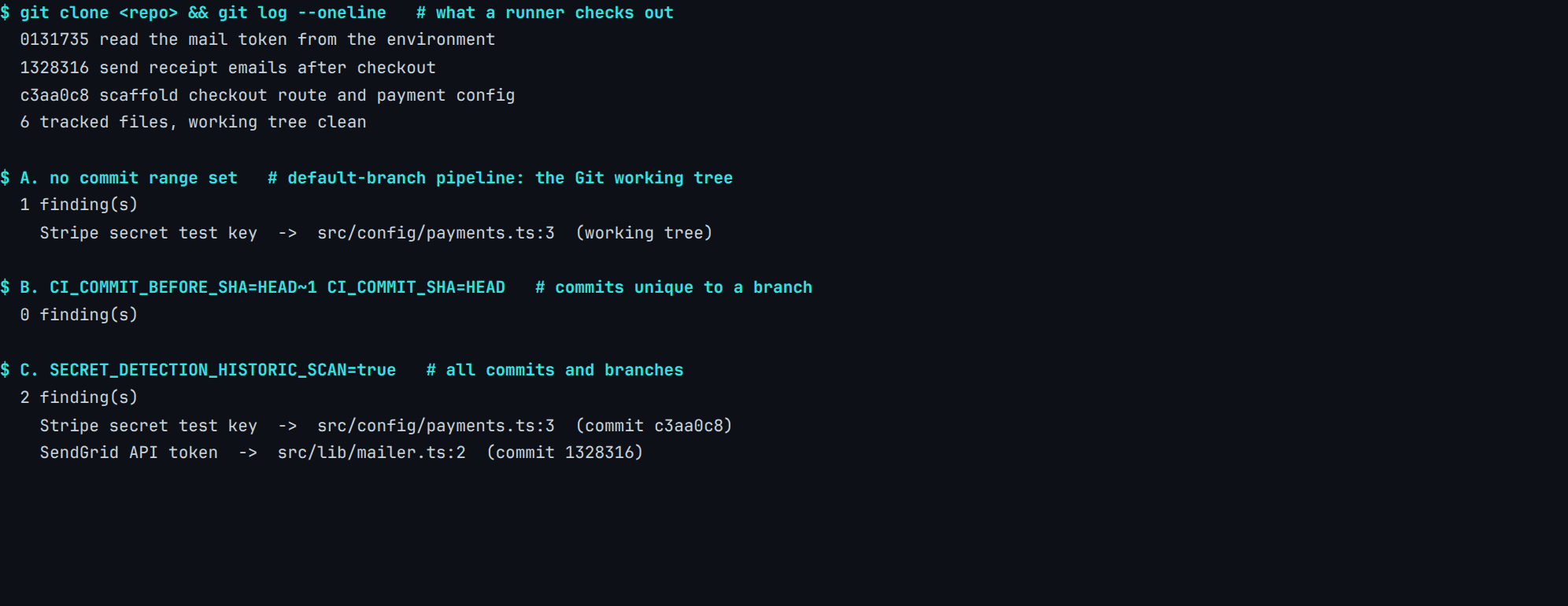
Real capture. GitLab secrets analyzer v7.38.0, secret detection rules v0.25.0, gitleaks 8.30.1, 28 July 2026. The analyzer prints those three strings at startup and this run keeps only the parsed reports, so they are recorded under image_provenance in content-pipeline/captures/gitlab-secret-scope-matrix/manifest.json, alongside the fixture.
Nothing about the repository changed between those runs. Same ruleset, same engine, and the six committed files byte-for-byte identical in all three. The only difference was a pair of CI variables most projects never think about, because GitLab sets them for you.
Why did the scan on the fix commit report nothing?
Run B's range covered exactly one commit, and that commit was the remediation: the SendGrid literal came out, process.env went in.
A commit range shows what those commits added. A scan of a removal therefore has nothing to look at, reports nothing, and is entirely correct to do so.
The job passes. The pipeline goes green. The SendGrid token is still one commit back, unchanged and readable by anyone who clones the repository, which by then is everyone on the team plus whatever CI, mirrors and forks exist.
Per GitLab's own pipeline documentation, the scope depends on where the pipeline is running: on the default branch, in analyzer v7.38.1 and later, the pipeline scans the content of all commits from the prior commit to the current commit, and falls back to the Git working tree when no valid prior commit is available. On a feature branch, in analyzer v7.35.0 and later, the content of all commits from the merge base to the latest commit is scanned.
The whole description of that analyzer release is one line: "Scan all commits of a feature branch (forked from the default branch) in branch pipeline (!479)". The behaviour a pipeline gets is decided in a changelog most people running the job will never open.
What does GitLab say its default scan does not read?
The same pipeline page carries the answer, in a sentence sitting under a heading about an optional feature, which is a reliable way for a sentence to go unread:
By default, pipeline secret detection scans only the current state of the Git repository. Any secrets contained in the repository’s history are not detected.
Having the vendor document the boundary is better evidence than any writeup of the feature could be, and GitLab goes further: it recommends running a historic scan once, immediately after switching the analyzer on, precisely because everything already in the history is otherwise invisible to it.
GitLab is equally plain about what a deletion does not do: "Removed secrets also persist in the Git history." Deleting the line is the fix almost everyone reaches for, and it is the one move that reliably makes a problem look solved while changing nothing about it.
The article on how a key gets hardcoded in the first place covers the arrival. This is the part afterwards, and it is where a pre-deploy scan of your own tree starts earning its place.
What can a scan of your own disk see that GitLab cannot?
The uncommitted file is the other half of this. It exists, it holds a credential shaped exactly like a real one, and the GitLab side has never received a byte of it.
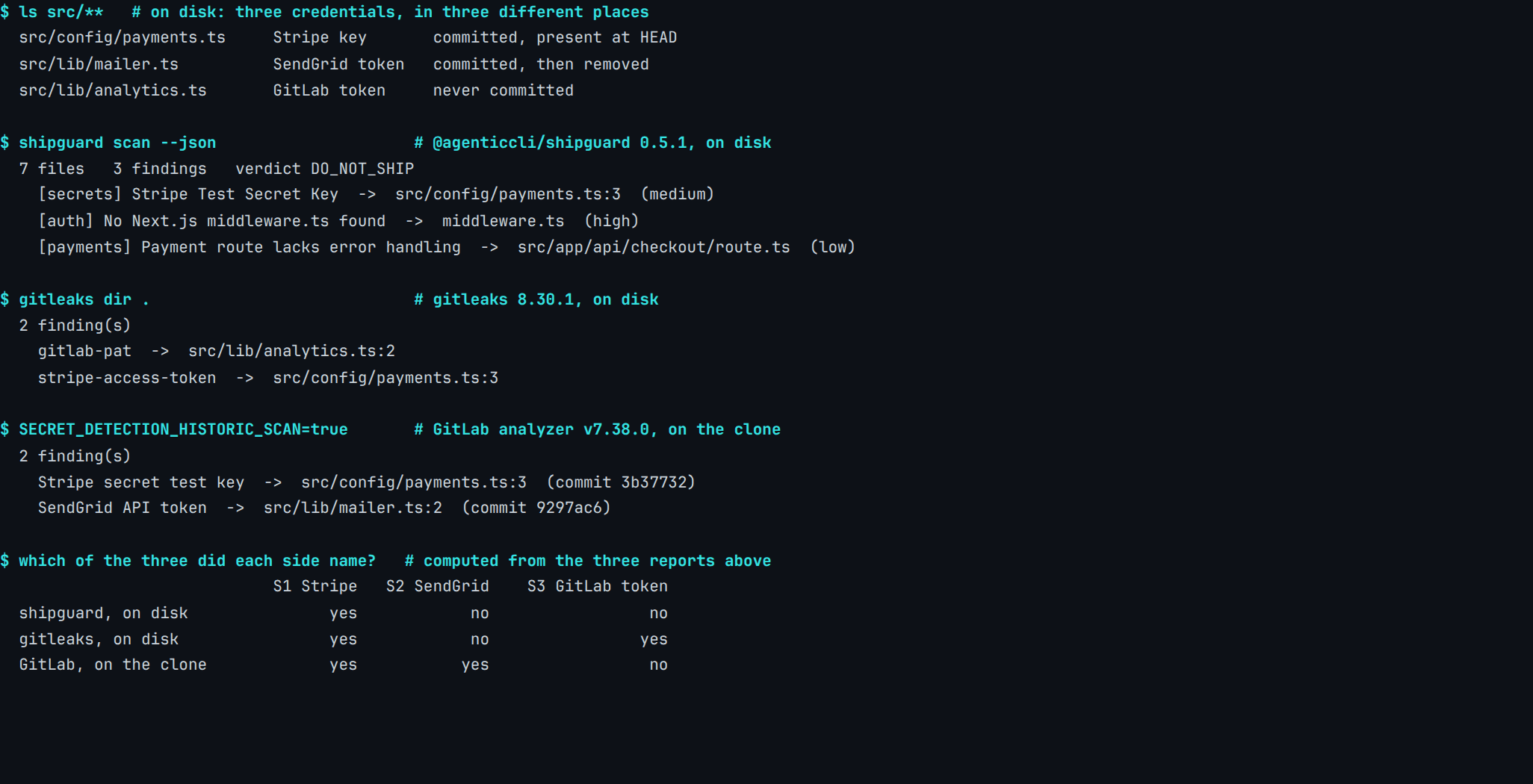
Real capture. @agenticcli/[email protected], Gitleaks 8.30.1, GitLab secrets analyzer v7.38.0 on its historic scope, 28 July 2026. Fixture and manifest: content-pipeline/captures/gitlab-secret-before-push/.
The GitLab side was handed its widest documented setting there, so nothing it failed to name can be put down to a badly configured pipeline. It read every commit and every branch in the repository, and the token in the untracked file was still not among the things it had any way to report on.
Which window is each credential inside?
| Credential | Where it sits | Which scan reaches it |
|---|---|---|
| Stripe secret test key | committed, still at HEAD | every one of them |
| SendGrid API token | committed, then deleted | only a scan that reads commits |
| GitLab personal access token | never committed | only a scan of the disk |
Three credentials · one repository · two sides
Each side is blind to exactly what the other one reads.
A scan of your disk reads files at their current content. A scan on GitLab reads what was pushed. One credential sits outside each of those windows, and neither side reports anything unusual about the one it cannot see.
Each side is blind to exactly what the other one reads, and neither reports anything unusual while being blind to it. A clean result from either is a true statement about a window rather than about a repository. The equivalent comparison on GitHub's side of the same question lands in the same place for a different platform, which suggests this is a property of where a scan runs rather than of anybody's product decisions.
Where does our own scanner land on this?
ShipGuard named the Stripe key and neither of the other two. It reads files rather than commits, so the deleted SendGrid token was never within its reach, and it carries no rule for a GitLab personal access token at any tier.
Its report also lists two findings that have nothing to do with credentials — a missing middleware.ts and a payment route without error handling — because a release gate asks a wider question than a secret scanner does.
ShipGuard 0.5.1 scores the missing middleware at 30, the Stripe key at 15 and the payment route at 5, against a DO_NOT_SHIP band that starts at 50. The tree lands on exactly 50, so all three findings are holding that verdict up.
Drop the payment route and 45 is left; drop the Stripe key and 35 is left. Both come back REVIEW_BEFORE_SHIP. Drop the missing middleware and 20 is left, which dist/cli.js:216-217 returns as SAFE_TO_SHIP: it tests score <= 20 first.
One of three — from the tool this site sells, on a fixture this site built. On the fixture behind a dependency scanner reading a lockfile, the same tool published a zero.
Doesn't secret push protection close the gap?
Per GitLab's push protection documentation, a push carrying a credential is rejected outright, and the message GitLab returns names the commit ID holding the secret, the filename and line, and the type of secret. So it closes part of the gap, and it is the feature to reach for.
That makes it the one GitLab mechanism acting before a credential reaches the server, which is the honest answer to anyone asking why a check on your own machine is needed at all. What such a check can name is a separate question: of six credentials seeded into one service, two were named by no scanner at all.
Its documentation page also carries the tier line Ultimate, while the secret detection overview page — the page setting out all three of GitLab's detection methods — carries Free, Premium, Ultimate. The mechanism that keeps a credential from arriving is the one on the top plan; the mechanism every plan gets runs after the push has already been accepted.
What are push protection's documented limits?
Narrower ones than the name suggests, and GitLab spells them out:
Secret push protection scans only the diffs of commits pushed over HTTP(S) and SSH. If a secret is already present in a file and not part of the changes, it is not detected.
The feature is skipped entirely when a push changes more than 3,150 paths or 350,000 lines, and a file or diff patch larger than 1 MiB is not checked either.
Reading diffs rather than whole modified files became the default in GitLab 17.11, when the feature flag holding it back was removed. Earlier releases scanned every modified file, which meant a push could be stopped over a secret the change had never touched.
A developer can also waive it deliberately, and GitLab documents both routes as ordinary steps. One is the push option git push -o secret_push_protection.skip_all. The other, in full: "Add [skip secret push protection] to one of the commit messages, on either an existing line or a new line, then push the commits." An audit event is recorded either way.
Is a documented bypass a weakness?
A gate with no escape hatch gets switched off the first week it is confidently wrong about a placeholder, and an audited waiver keeps the record while letting the work continue.
The waiver does make the guarantee procedural rather than absolute: it holds while the people using it agree to let it hold. That is worth planning around, and it is worth knowing which of your credentials would have been in the diff at all.
Push protection is the one thing here we did not run ourselves. It is server-side, on a hosted GitLab instance, and exercising it would have meant pushing real-shaped credentials to a real project, so every statement in these three sections is GitLab's documentation cited as documentation.
What do you do about a key that already shipped?
Rotate it. Not later, and not once the history is tidy.
GitHub's guidance on removing sensitive data opens by saying that where the exposed data is a credential you need to revoke or rotate it as a first step, and that once revoked "it can no longer be used for access, and that may be sufficient to solve your problem".
The same page is candid about the limits of the alternative: "If the commit that introduced the sensitive data exists in any forks, it will continue to be accessible there." Cached pull-request views are on that list too, and neither is something a rewrite of your own history reaches.
Rotation ends the exposure. Everything else is housekeeping on a value that no longer opens anything, which is a much better problem to have on a Friday afternoon. Before rotating, run a scan for the ones you have forgotten: an audit of four ordinary feature prompts found hardcoded AWS credentials in one of them.
What does replacing the key actually change?
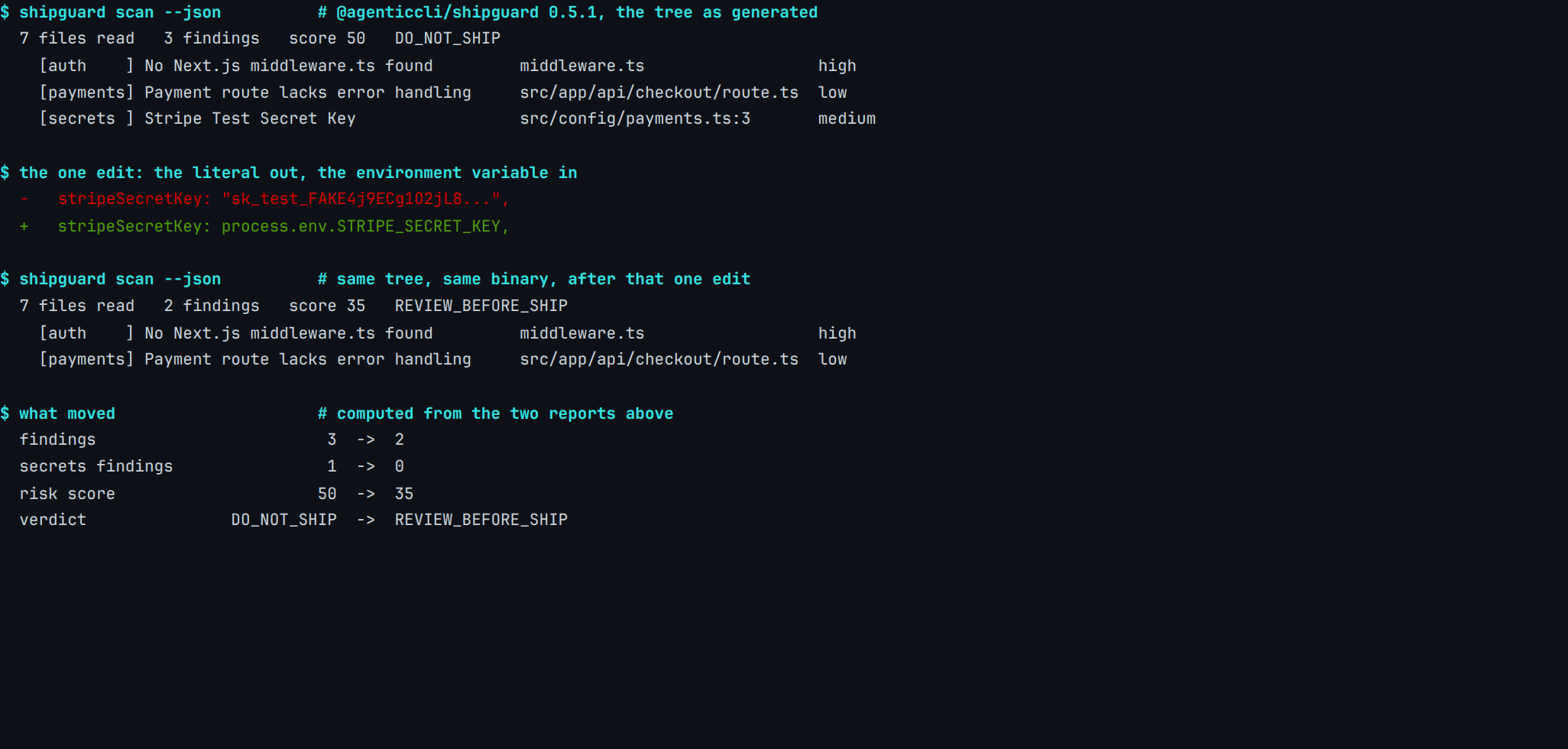
Real capture. @agenticcli/[email protected], 28 July 2026. The fixture goes back to its starting state, src/config/payments.ts is pointed at process.env.STRIPE_SECRET_KEY, and the same binary reads the tree again with nothing else touched. Fixture and manifest: content-pipeline/captures/gitlab-secret-replace-vs-rotate/.
That is the edit everybody makes, and it is worth making. What moved there is a tool's answer about a file. Nothing in it reached Stripe, so the key already sitting in the first commit, and in every clone taken since, opens exactly what it opened before. Only the issuer can end that. The issuer was never asked.
Is rewriting the history worth it?
OWASP's Secrets Management Cheat Sheet puts revocation and rotation ahead of any cleanup in the credential lifecycle, and is specific about what the cleanup costs:
Secrets in code could have commit history for the exposure squashed to before the introduction of the secret, however, this may introduce other problems as it rewrites git history and will break any other links to a given commit.
Two platform vendors and one standards body, none of them selling the same product, converge on the same order of operations. Rotate first, confirm the old value no longer authenticates, and only then treat the history as a separate question with its own cost.
Sometimes the answer to that question is yes: a public repository with a credential that cannot be rotated quickly is a real case for a rewrite. More often the rewrite is the part that feels like progress while the rotation is the part that ends the exposure.
Where does each check actually belong?
| The question | What answers it |
|---|---|
| Is there a credential in the file I just wrote? | a scan of the working tree, before you commit |
| Is there one in what I am about to push? | secret push protection, on Ultimate |
| Is there one in what already got pushed? | pipeline secret detection, on the branch it runs on |
| Is there one anywhere in the history? | a historic scan, once, after enabling the feature |
A working-tree scan runs on a machine you already have, over files you already have, before anything leaves the building. It is also the only row of the four that can see a file git has never tracked, which is the cheapest coverage on the list by a distance.
It belongs beside a scan of a stack's own configuration rather than instead of the three below it, and it is worth running on the same reflex as a formatter. Whether your particular credential is even the kind a pattern matcher can grip is a separate question with its own experiment, where the answer turns out to depend on the variable name as much as on the value.
What this run does not show
Commit SHAs in those screenshots are not reproducible. The fixture rebuilds its history on every run, so the counts, the file paths and the commit-versus-working-tree distinction all survive a re-run while the seven-character SHAs do not, and the manifests record that.
We set the CI variables by hand rather than running a real GitLab pipeline. What is measured is therefore what the analyzer does with a given scope, not that GitLab always selects that scope; the mapping from branch type to scope is GitLab's documented behaviour and is quoted as such above.
Both rulesets sit on the machine that produced these captures, and both are countable. Neither count appears here.
A count would be stale on the next release of either one, and it would invite a comparison that tells a reader nothing about whether their own key gets caught. A green secret-detection job is a statement about an artifact and a scope, and knowing which pair produced yours is most of what makes the green mean anything.
FAQ
What is GitLab secret detection?
Does GitLab secret detection scan the whole git history?
Why did a GitLab secret detection job pass when a secret was in the repository?
Is GitLab secret push protection available on the free tier?
Is deleting the line and committing enough to fix a leaked key?
Should I run a secret scan locally as well as in GitLab?
────────[ ▮ gate ]────────
Don't ship the next one.
Free, local, no account. Catches this exact bug class before deploy.
$ npx @agenticcli/shipguard scan