AI Supply Chain Security: 0 Advisories, Then 46
Short answer: AI supply chain security is the work of checking code you did not write but did install. On a repository that means the dependency block: which packages resolved, to which versions, and whether a public database already carries advisories against them. Answering that needs a lockfile, because resolved versions are written down nowhere else.
Asked for file uploads, an argument parser and an HTTP client, an agent wrote five pinned dependencies into a package.json: [email protected], [email protected], [email protected], [email protected] and [email protected]. Every one of those is a real npm release, and every one of them has published advisories against it. We committed the file with no lockfile, which is how a pull request usually arrives, and ran four scanners over the repository.
Nothing came back. Not one finding, from any of them.
This is not an exotic risk category. OWASP moved Software Supply Chain Failures to third place in its 2025 Top 10, where it carries the highest average incidence rate in the contributed data at 5.19%, and the category text notes the risk "has grown in scope to include all supply chain failures, not just ones involving known vulnerabilities".
Every package in that block is real and resolves to something. A name an agent invented that nobody has registered yet is a different failure with a different fix. The only thing the two share is the file they arrive in.
What did four scanners find in a dependency block an agent wrote?
The repository is a small Node service in six files, and its dependency block is the only thing wrong with it. No credential, no unguarded route, no unsafe sink — all deliberate, because seeding one would have produced a finding from a secrets rule and turned a clean result into an ambiguous one.
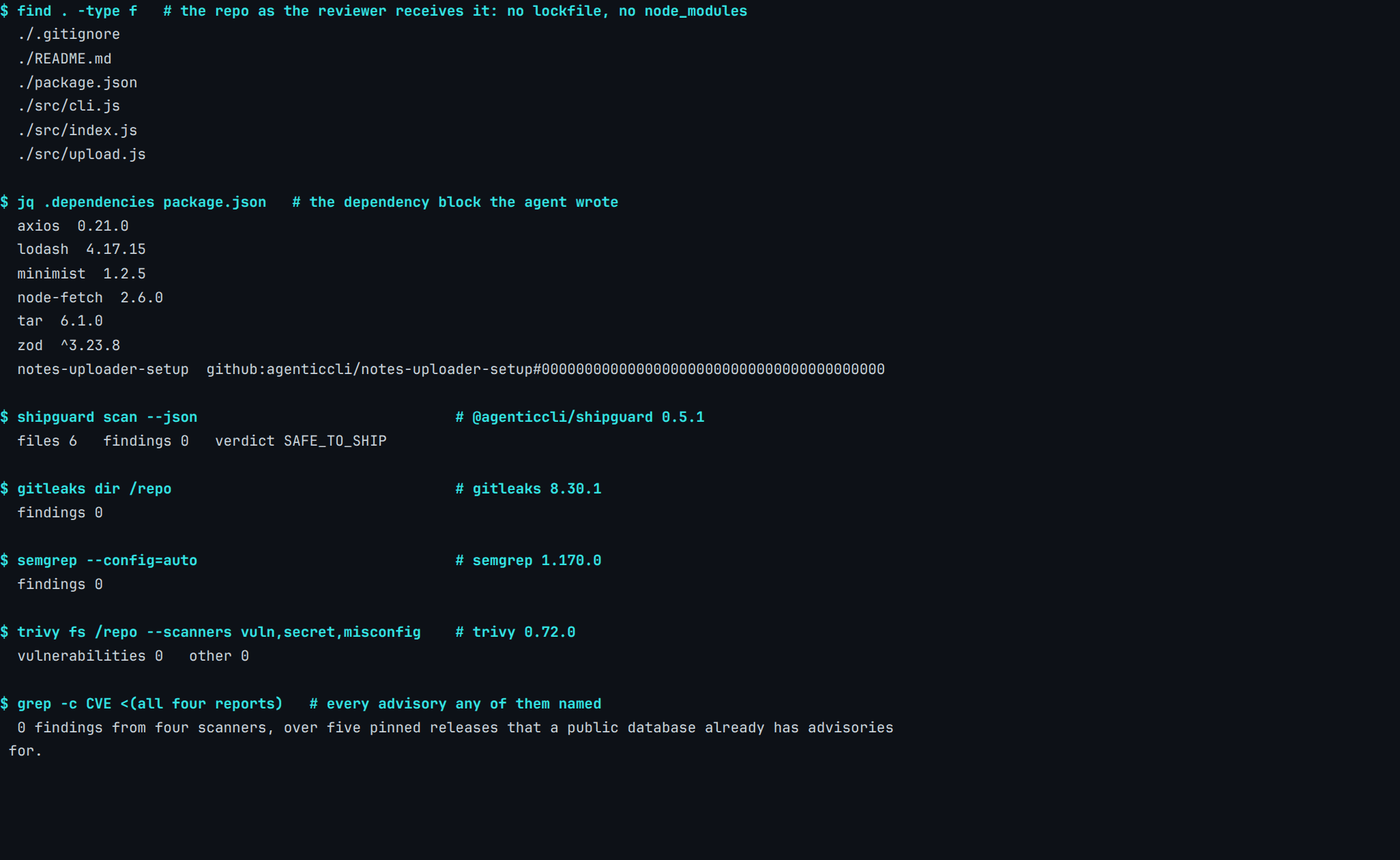
Real capture. @agenticcli/[email protected], Gitleaks 8.30.1, Semgrep 1.170.0, Trivy 0.72.0, 28 July 2026. Fixture and manifest: content-pipeline/captures/agent-deps-four-scanners/.
| Tool and version | The command run | What it reported |
|---|---|---|
@agenticcli/shipguard 0.5.1 |
shipguard scan --json |
files 6 findings 0 verdict SAFE_TO_SHIP |
gitleaks 8.30.1 |
gitleaks dir /repo |
findings 0 |
semgrep 1.170.0 |
semgrep --config=auto |
findings 0 |
trivy 0.72.0 |
trivy fs /repo --scanners vuln,secret,misconfig |
vulnerabilities 0 other 0 |
Three of those four are working exactly as designed. A secret scanner looks for credentials, a code scanner matches patterns in source, and neither has any business ranking tar versions. Point the same tools at a repository with a leaked key in it and they behave completely differently, so a flat result here says something about rule coverage rather than about the tools.
Trivy is the interesting one, because it does read dependency manifests, it is the tool you would reach for on exactly this question, and it returned nothing on a file naming five releases its own database already knows about.
Why did the same command return 46 advisories the second time?
We ran npm install --ignore-scripts, which writes package-lock.json and executes no third-party lifecycle script, then ran the identical Trivy command again against the same directory. Both runs used --skip-db-update against one cached advisory database, so nothing on the database side moved between them.
One repository · one command · two answers
The dependency block never changed. The lockfile did.
Both panels hold the same six committed files and the same seven dependency entries. The only difference is whether the resolved versions have been written down anywhere a scanner can read them.
Per GitHub's own documentation, "The dependency graph is a summary of the manifest and lock files stored in a repository and any dependencies that are submitted for the repository using the dependency submission API." Dependabot alerts and pull-request dependency review are built on that graph, so the same input dependency applies to them.
CERT/CC reached the same practical conclusion from the other direction, in its coordinated note on the September 2025 npm compromise: "Lock dependencies: Use package-lock.json or npm i --package-lock-only to lock resolved dependency versions without executing install scripts, allowing safe auditing."
What does npm print during the install, and what does it leave out?
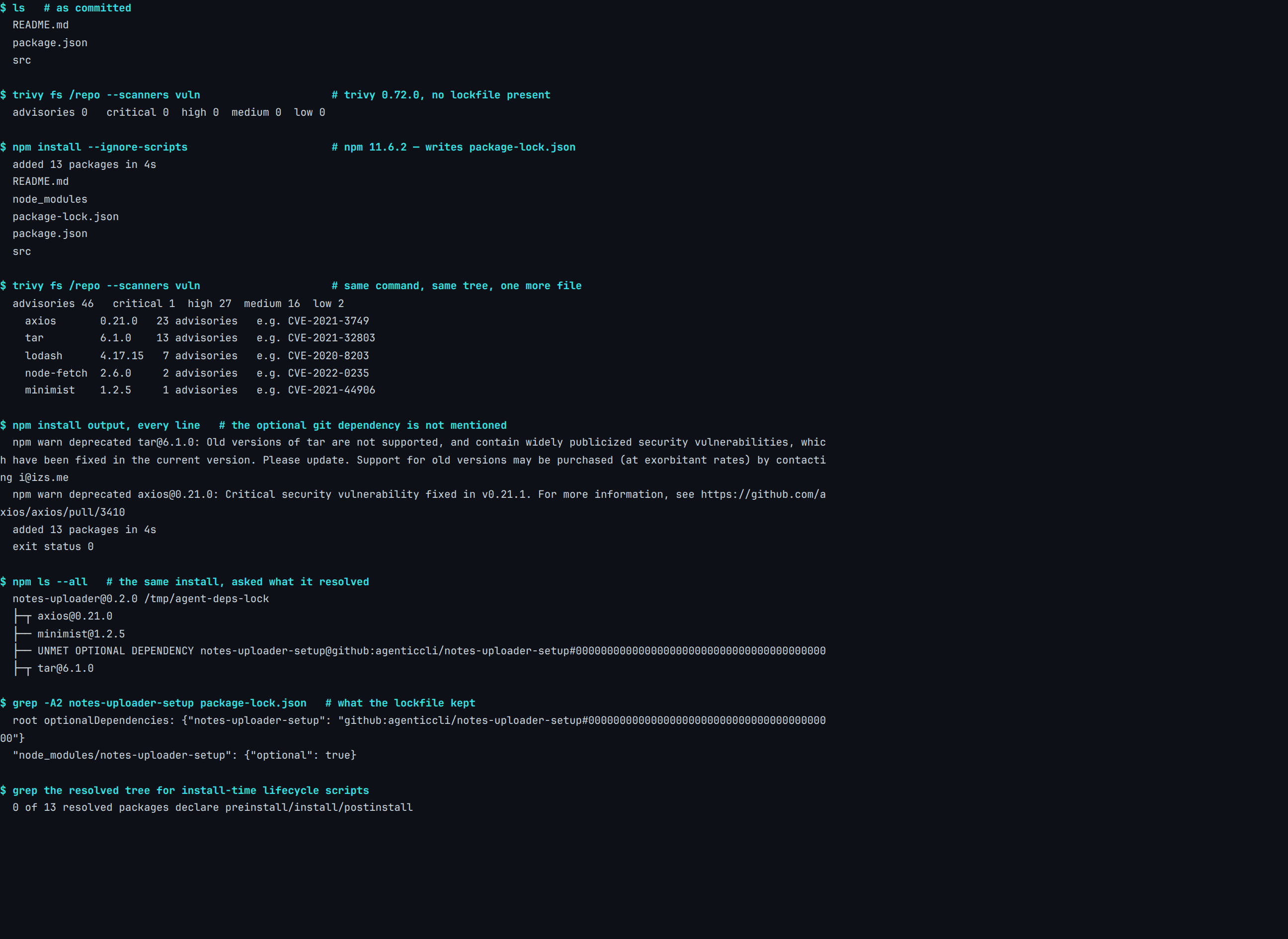
Real capture. npm 11.6.2, Trivy 0.72.0 against one fixed database snapshot, 28 July 2026. Fixture and manifest: content-pipeline/captures/agent-deps-lockfile-flip/.
npm did tell us something, and it told us in English rather than in a report anyone has to open. tar and axios both drew a deprecation notice naming a security fix, right there in the install output; lodash, minimist and node-fetch scrolled past without comment. Partial coverage is the awkward case, because a developer who watches the install line and sees nothing has just been taught something false about the pins nobody warned about.
What did the install not mention at all?
The seventh dependency entry is quieter still. It is an optionalDependencies line pointing at a git URL for a repository that does not exist, and the install exited 0 without mentioning it. Only npm ls --all reports it, as UNMET OPTIONAL DEPENDENCY, and the lockfile keeps a stub with no resolved URL and no integrity hash against it.
That silence has been weaponised. In May 2026, 84 malicious versions across 42 @tanstack/* packages were published to npm under a legitimate trusted-publisher identity, and the payload arrived through exactly this shape. The advisory for CVE-2026-45321 describes what happened next:
The trailing exit 1 causes the optional install to fail, after which npm silently discards it — leaving no node_modules trace.
Reading what got installed would have shown you nothing in that incident, because there was nothing left to read: the evidence sat in the manifest, which happens to be the one file an agent edits directly and a reviewer skims fastest.
Do install scripts still matter if nothing in your tree declares one?
Zero of the thirteen packages our install resolved declares a preinstall, an install or a postinstall script. npm is changing the default that governs those scripts anyway, and on this tree that change would have altered nothing.
GitHub's changelog of 9 June 2026 states it plainly: "allowScripts defaults to off: npm install will no longer execute preinstall, install, or postinstall scripts from dependencies unless they are explicitly allowed in your project." Two sibling defaults move with it — --allow-git and --allow-remote both go to none, which is the direct answer to the delivery mechanism above.
The vector those defaults close is not theoretical. The Nx compromise of August 2025 shipped a postinstall that harvested credentials, and its maintainers wrote something worth quoting in full:
However, there are many less obvious ways NPM modules could get installed. Transitive dependencies, AI agents, editors, other editor extensions, other scripts are the first that come to mind but there are many many less obvious reasons why NPM modules might get installed.
That is a compromised project's own maintainers, in their own incident writeup, listing AI agents among the things that install packages on your behalf. CERT/CC records the same postinstall vector in the Shai-Hulud campaign and in the event-stream attack of 2018.
An install script is code running with your privileges because you typed a command about dependencies, which puts it in the same family as everything else an agent's tooling is permitted to do without asking first.
Has anyone shipped a different default?
pnpm's hardening documentation describes a minimumReleaseAge setting: "The minimumReleaseAge setting defines the minimum number of minutes that must pass after a version is published before pnpm will install it." It defaults to 1440 minutes in pnpm v11, so a freshly published version is not resolved for a day.
Its blockExoticSubdeps option refuses transitive dependencies resolving from git repositories or tarball URLs. We wrote both settings into a pnpm-workspace.yaml, rather than trusting a version default, and installed the same seven dependency entries under them.
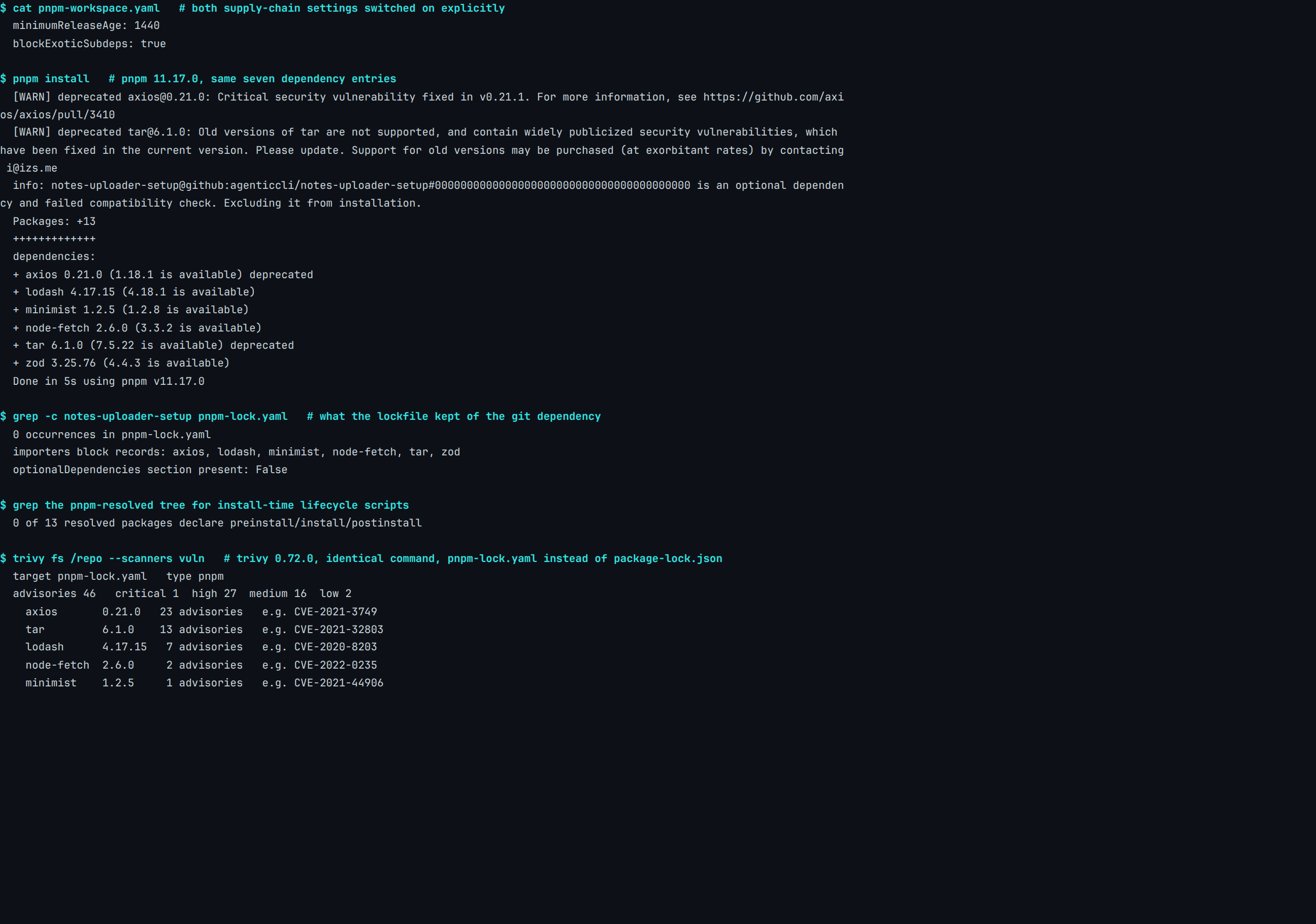
Real capture. pnpm 11.17.0, Trivy 0.72.0 against the same fixed database snapshot, 28 July 2026. Fixture and manifest: content-pipeline/captures/agent-deps-pnpm-defaults/.
What did those defaults actually withhold?
Every pin in this block is years old, so a minimum release age has nothing to hold back, and the git entry is a direct dependency rather than the transitive kind blockExoticSubdeps covers. Neither setting withheld a package. Thirteen resolved, the same thirteen npm resolved, and pnpm found no build step to skip in any of them.
What pnpm did differently was speak. It named notes-uploader-setup as it excluded it, in the middle of an ordinary install, where npm had said nothing about it at all. Its lockfile then keeps no trace of that entry, against the stub npm's keeps.
Trivy read pnpm-lock.yaml and came back with the same 46 advisories, in the same severity split, that agent-deps-lockfile-flip recorded over package-lock.json. The defaults your installs run under were chosen by somebody, and they can be chosen again.
Which question does each check actually answer?
Two of these questions are answerable from the files a pull request carries. The other three need one that does not exist until somebody installs.
| The question | What answers it |
|---|---|
| Is there a credential in this repo? | A secret scanner, on every commit |
| Does this code do something unsafe? | A code scanner reading the sources |
| Does a resolved version have advisories? | A dependency scanner reading the lockfile |
| Does anything run at install time? | The manifests in the resolved tree |
| Is this package what it claims to be? | Provenance, checked at install |
The last row is the newest. npm audit signatures verifies registry signatures on what you downloaded, and the npm documentation notes that "The audit signatures command will also verify the provenance attestations of downloaded packages." That verification wants a current npm CLI, often newer than the one Node.js bundles, so read a missing attestation as a question rather than a verdict.
ShipGuard, Gitleaks and Semgrep answered the first two rows over the committed tree with nothing installed. Trivy could not answer the third until an install had written a lockfile, which is why the checks that read what is committed run wherever you like and the rest run beside your install.
What does this run not prove?
A fixture proves what the checks see; it says nothing about how often the input turns up. Measuring how frequently agents pin vulnerable versions would take a corpus of real agent output and a labelling protocol, and we built neither.
The advisory count depends on a vulnerability database as well as on the pinned versions, and the number is stamped to its version, date and fixture rather than offered as a current fact.
ShipGuard holds no rule matching any package in this fixture, which is why it read six files, found nothing, and said SAFE_TO_SHIP. Its dependency rules are Pro-tier version pins on named frameworks — the next key in a package.json, langchain-core in a requirements file — read out of the manifest rather than resolved and looked up.
That is the honest answer to the question a release gate asks about your own code, and the wrong answer to the one a dependency block raises. Knowing which of your tools reads which file turns out to be most of the work, and it is the part nobody writes down.
FAQ
What is AI supply chain security?
Why does a dependency scanner need a lockfile?
Does ShipGuard scan dependencies for known vulnerabilities?
Do install scripts still matter after npm v12?
How do I check the dependencies an AI agent just added?
────────[ ▮ gate ]────────
Don't ship the next one.
Free, local, no account. Catches this exact bug class before deploy.
$ npx @agenticcli/shipguard scan