Vibe Coding Security: 12 Checks Before You Ship
Short answer: Vibe coding security means checking twelve concrete conditions AI coding tools routinely miss — hardcoded secrets, disabled Supabase RLS, open Firebase rules, unguarded admin routes, unverified payment webhooks — because these tools optimize for a working demo, not a second user. A real ShipGuard scan of a seeded test app found 22 issues across 13 files, most auto-detectable today.
We built a kitchen-sink test app seeded with one real mistake per check below — a hardcoded Stripe key, a Supabase migration with no Row Level Security, a Firebase firestore.rules file still in test mode, an unguarded admin route, a payment webhook with no signature check — and ran @agenticcli/shipguard@0.5.0 against it with no flags, no login, and no cherry-picking. It came back with 22 findings across 13 files: 6 critical, 8 high, 7 medium, 1 low, verdict DO_NOT_SHIP. Two of the seeded mistakes produced zero findings. This article is both the checklist and the honest account of which parts of it a scanner catches today, which parts it doesn't, and why.
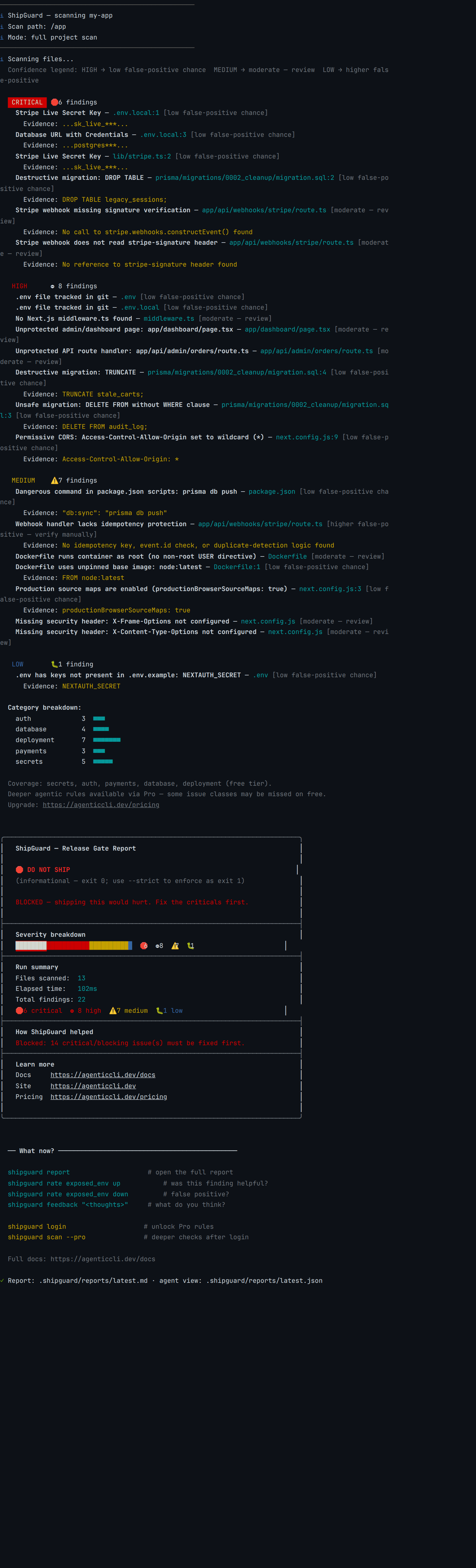
Vibe coding security risk comes from AI coding tools optimizing for "the demo works," not "this survives a second user" — the twelve checks below are the concrete, runnable conditions that catch the gap between those two bars: secrets in code, database access controls, auth on sensitive routes, payment webhook verification, destructive migrations, and deployment hardening. Run them before every deploy, whether by hand or with a CLI gate.
At a glance
- A real scan of our seeded test app found 22 issues — a live Stripe key hardcoded twice, an unguarded admin API route, a payment webhook with no signature check,
DROP TABLEsitting in a migration file, and more. - Two of the twelve checks below — Supabase RLS and Firebase rules — produced zero findings on the free tier, on purpose, so we could show you exactly where automated coverage stops today.
- One check — dependency/supply-chain risk — has no general detector in ShipGuard at all, free or Pro. That's still worth checking by hand.
- Every check maps to a real, named 2025-2026 incident, not a hypothetical: Lovable's exposed RLS-off databases, the Tea app's open Firebase storage bucket, Moltbook's 1.5-million-token leak.
- This is the hub for our vibe-coding-security cluster — five deeper pieces on specific check domains are linked throughout.
The 12 checks at a glance
| # | Check | What it catches | Coverage today | Found in our scan |
|---|---|---|---|---|
| 1 | Secrets in code/env | Hardcoded API keys, DB credentials in source or .env* |
Free (ShipGuard) | Yes — 5 findings |
| 2 | Supabase Row Level Security | Tables readable/writable by anyone with the anon key |
Pro-only; free tier: 0 findings on our fixture | No (documented gap) |
| 3 | Firebase security rules | Test-mode rules left open, wildcard allow statements |
Pro-only (narrow); free tier: 0 findings | No (documented gap) |
| 4 | Auth on admin routes + API mutations | Unprotected dashboard pages and API handlers | Free (ShipGuard) | Yes — 3 findings |
| 5 | Payment webhook signatures | Forged Stripe/Razorpay events accepted as real | Free (ShipGuard) | Yes — 3 findings |
| 6 | Destructive DB migrations | DROP TABLE, TRUNCATE, DELETE with no WHERE |
Free (ShipGuard) | Yes — 4 findings |
| 7 | CORS wildcards | Access-Control-Allow-Origin: * on an API |
Free (ShipGuard) | Yes — 1 finding |
| 8 | Security headers | Missing X-Frame-Options / X-Content-Type-Options |
Free (ShipGuard) | Yes — 2 findings |
| 9 | Docker: root user + unpinned image | Container runs as root, :latest base image |
Free (ShipGuard) | Yes — 2 findings |
| 10 | Source maps in production | productionBrowserSourceMaps: true ships real source |
Free (ShipGuard) | Yes — 1 finding |
| 11 | .env hygiene |
Tracked .env files, undocumented keys |
Free (ShipGuard, partial) | Yes — 1 finding |
| 12 | Dependency / supply-chain risk | Malicious or vulnerable packages, hallucinated deps | Manual only — no general detector | No (not implemented) |
Why AI-built apps fail the same twelve things
An AI coding agent's feedback loop is short: does the app run, does the button work, does the demo look right. None of the twelve checks below show up in that loop. A hardcoded Stripe key authenticates exactly as well as an environment variable — the app works either way. A table with Row Level Security off returns query results exactly as fast as one with it on — faster, actually, since there's no policy to evaluate. The agent optimized for the thing it could see. Every item on this list is a thing it couldn't.
The scale is not hypothetical. GitGuardian's State of Secrets Sprawl 2026 post says Claude Code-assisted commits showed a 3.2% secret-leak rate, versus a 1.5% baseline across all public GitHub commits, and that 28.65 million new hardcoded secrets were added to public GitHub commits in 2025, a 34% increase year over year and the largest single-year jump it has recorded.
"The issue is that these systems behave very differently from the software we are used to. I do not just mean that AI can find vulnerabilities in software, though it can. I mean that AI systems have inherent vulnerabilities of their own. They can be tricked in ways people can be tricked, so you need a different security mindset."
— Zico Kolter, Member, OpenAI Board of Directors, Safety & Security Committee; Professor, Carnegie Mellon University · "Red-Teaming after Mythos," Latent Space
Part of why review doesn't catch this at the rate it should is sheer surface area. Cursor's Developer Habits Report (Spring 2026) found average lines of code per pull request rose roughly 250% year over year, and the share of "mega PRs" — 1,000+ lines changed in one PR — grew from 8% in January 2025 to nearly 14% by May 2026. A twelve-item checklist run against a focused diff is tractable. The same checklist run once, after the fact, against a 1,000-line PR that touches six files is exactly the kind of review load that gets skimmed, not read.
None of the twelve checks below require you to understand a model's internals. They require you to check twelve specific, concrete conditions in your own repo. Here they are.
1. Secrets hardcoded in code and env files
What it is: An API key, database password, or signing secret written directly into a source file or an environment file that gets tracked in git, instead of injected at runtime from your deploy platform's secret store.
Why AI apps fail it: An agent asked to "connect Stripe" needs credentials to make the connection work, and the fastest path is pasting the key wherever it's needed — sometimes twice, once in .env.local and again directly in the client-init file, "just to be safe." Both copies pass every test. Neither shows up in a demo.
How to check manually: grep -rn "sk_live_\|AKIA\|BEGIN.*PRIVATE KEY" . --include="*.ts" --include="*.env*" across your repo, and confirm .env* is actually in .gitignore — not just present, but effective (git check-ignore .env.local should print the path).
What our scan found: Five findings on this alone — a live-shaped Stripe secret key hardcoded in both .env.local and lib/stripe.ts, a Postgres connection string with embedded credentials, and both .env files flagged as tracked-in-git. This is the check ShipGuard's free tier covers most completely; see our full teardown of a real Stripe-key leak and the Next.js + Supabase scan for the deeper version of this one check. GitGuardian retested its 2022 dataset of valid secrets in January 2026 and found the validity rate still above 64% — Football Australia's AWS keys sat exposed in its site source for more than 700 days before anyone noticed.
2. Row Level Security enabled (Supabase)
What it is: A PostgreSQL policy, enforced by Supabase's auto-generated REST API, that restricts which rows a given user can read or write — the only thing standing between a public anon key and your entire table.
Why AI apps fail it: CREATE TABLE works without ENABLE ROW LEVEL SECURITY. The table exists, queries return data, the demo runs. Nothing forces the second statement, and it produces zero visible difference until a second user shows up asking for someone else's row.
How to check manually: select tablename, rowsecurity from pg_tables where schemaname = 'public'; — any false row is world-readable and world-writable through the anon key today.
What our scan found: Nothing. We seeded supabase/migrations/0001_create_orders.sql with exactly this gap and it produced zero findings, on purpose — supabase/migrations/ isn't in the free tier's recognized migration-path list, and RLS-disabled detection (supabase.rls.table-rls-disabled) is a documented Pro-tier rule, not bundled free. CVE-2025-48757 records an insufficient database Row-Level Security policy in Lovable that lets remote unauthenticated attackers read or write arbitrary database tables of generated sites. See our full Supabase RLS breakdown for the mechanism and the fix.
3. Firebase security rules (not left in test mode)
What it is: The firestore.rules and storage.rules files that are Firebase's entire authorization boundary — there's no ORM or server route standing between a client and your data underneath them.
Why AI apps fail it: Firebase's own console defaults a new project to "test mode": allow read, write: if request.time < timestamp.date(...) — full access, no login, for 30 days. An agent scaffolding a database picks this because it's the path that doesn't throw permission errors during setup.
How to check manually: Open firestore.rules and search for match /{document=**} combined with an allow that has no request.auth condition, or a date-based request.time check instead of one. Same pattern in storage.rules, searching for match /{allPaths=**}.
What our scan found: Nothing, again on purpose — we seeded the exact console-generated test-mode rule and it produced zero findings. ShipGuard's free bundled checks don't parse .rules files at all, and even the Pro corpus's Firebase detectors are built to match a literal if true, not the date-expiry string test mode actually ships. The Tea app's July 2025 breach came from precisely this: a Firebase storage bucket with no access control exposed 72,000 images, then a second incident exposed 1.1 million private messages. Full mechanism in our Firebase test-mode teardown.
4. Auth guards on admin routes and API mutations
What it is: A server-side check — auth(), getServerSession(), a session cookie verification — on every route and API handler that touches admin, dashboard, billing, or account data, not just a client-side redirect.
Why AI apps fail it: Middleware isn't part of the App Router scaffold by default, and an agent generating a /dashboard page or an /api/admin/orders route handler focuses on making the data load — auth is a separate, easy-to-skip step that produces no visible failure in a solo-user dev environment.
How to check manually: Open every file under app/(admin|dashboard|billing)/ and every app/api/(admin|users|billing)/ route handler and confirm each one calls a real session check before touching data — not just rendering a login-gated UI on top of an ungated data fetch.
What our scan found: Three findings — no middleware.ts anywhere in the repo, an unprotected app/dashboard/page.tsx with no auth call at all, and an app/api/admin/orders/route.ts handler that returns data to any caller. Middleware alone isn't a full fix, either — CVE-2025-29927 showed middleware-based auth can itself be bypassed, which is why Server Components and route handlers need their own session check regardless of what middleware does upstream.
5. Payment webhook signature verification
What it is: Verifying that an incoming Stripe or Razorpay webhook actually came from the provider — stripe.webhooks.constructEvent() against the raw request body and the stripe-signature header — before acting on it.
Why AI apps fail it: A webhook handler that just parses req.json() and checks event.type works in every manual test, because you're the one sending the test event. It has no way to fail visibly until someone sends a forged one.
How to check manually: Open your webhook route and confirm it calls stripe.webhooks.constructEvent(rawBody, sig, webhookSecret) — not just JSON.parse(await req.text()) — using the raw unparsed body, since a parsed-then-restringified body breaks the HMAC check.
What our scan found: Three findings on our seeded app/api/webhooks/stripe/route.ts — no constructEvent() call, no stripe-signature header read, and no idempotency guard against the same event being delivered twice. Without signature verification, anyone who finds the webhook URL can POST a fake payment_intent.succeeded event and trigger fulfillment logic without paying.
6. Destructive database migration operations
What it is: DROP TABLE, TRUNCATE, or DELETE FROM with no WHERE clause sitting in a migration file that will run automatically against production.
Why AI apps fail it: An agent asked to "clean up the old sessions table" reaches for the direct, obviously-correct SQL — drop it, truncate it, delete everything — because that's what "clean up" means in isolation. It has no model of which environment the migration will eventually run against.
How to check manually: Read every new migration file before merging, specifically hunting for DROP, TRUNCATE, and bare DELETE FROM with no filtering clause — three patterns that should never appear in a migration without a second human decision attached.
What our scan found: Four findings — a real DROP TABLE, a DELETE FROM audit_log with no WHERE, a TRUNCATE stale_carts, and a "db:sync": "prisma db push" script in package.json, which bypasses the migration file audit trail entirely and applies schema changes straight to the database.
7. CORS wildcards
What it is: An Access-Control-Allow-Origin: * response header that lets literally any website's JavaScript read your API's responses in a logged-in user's browser.
Why AI apps fail it: Wildcard CORS is the fastest way to make a cross-origin fetch stop failing during local development, and an agent debugging a blocked request reaches for the setting that makes the error disappear rather than the one that scopes it to the actual frontend origin.
How to check manually: grep -rn "Access-Control-Allow-Origin.*\*" . across your config files and API middleware.
What our scan found: One finding, in next.config.js's headers() block — a wildcard origin on an /api/:path* route, which combined with credentialed requests can expose authenticated user data to any site that gets a logged-in user to visit it.
8. Security headers
What it is: X-Frame-Options (blocks clickjacking via iframe embedding) and X-Content-Type-Options: nosniff (blocks MIME-sniffing attacks) — two headers that cost one line each and are absent from most scaffolds by default.
Why AI apps fail it: Next.js doesn't set these automatically, and an agent that defines a headers() function for one purpose (usually CORS, see check 7) has no reason to also populate the security headers nobody asked for by name.
How to check manually: Check whether your next.config.js (or equivalent) headers() function includes both headers explicitly — their absence produces no error and no visible symptom.
What our scan found: Two findings — both headers missing from a next.config.js that already defines a headers() function for CORS, meaning the mechanism to add them exists and simply wasn't used.
9. Docker: non-root user and pinned base images
What it is: A Dockerfile that runs the container process as a dedicated non-root user (via a USER directive) and pins its base image to a specific version or digest instead of :latest or no tag at all.
Why AI apps fail it: The default, un-opinionated Dockerfile an agent generates from a "containerize this" prompt runs as root because that's what works with zero extra lines, and uses node:latest because that's the shortest FROM line that builds successfully today.
How to check manually: Open your Dockerfile and confirm a USER directive exists and isn't root, and that every FROM line specifies a version tag or digest — never a bare image name or :latest.
What our scan found: Two findings — FROM node:latest with no non-root USER directive anywhere in the file. An unpinned base image can silently pull in a different, unreviewed image between builds; running as root turns any container-escape bug into full host access instead of a scoped one.
10. Source maps disabled in production
What it is: The productionBrowserSourceMaps Next.js config flag, which — when left true — ships your original, unminified application source alongside the production bundle for anyone to read in browser devtools.
Why AI apps fail it: Source maps make local debugging easier, and an agent that enables them to fix a stack-trace problem during development has no reason to flip the flag back off before a production build, since nothing about the app's behavior changes either way.
How to check manually: grep -n "productionBrowserSourceMaps" next.config.js — if it's true, or absent with source maps enabled some other way, your original source is one devtools tab away from anyone.
What our scan found: One finding — productionBrowserSourceMaps: true in next.config.js, exposing the exact source structure and logic an attacker would otherwise have to reverse-engineer from minified output.
11. .env hygiene: tracked files and documented keys
What it is: No .env* file tracked in git, and every key present in your actual .env documented (with a placeholder, never a real value) in a committed .env.example so the two never silently drift apart.
Why AI apps fail it: An agent creates .env.local before a .gitignore rule excludes it, and the first commit ships it. Later, a new key gets added directly to .env without anyone updating .env.example, so the file that's supposed to document required configuration quietly goes stale.
How to check manually: git ls-files | grep '^\.env' should return nothing beyond .env.example. Then diff the key names (never values) between .env and .env.example — any key in the former missing from the latter is undocumented.
What our scan found: One finding — a plain .env carrying a key (NEXTAUTH_SECRET) not listed in .env.example. Worth naming honestly: this check matches the exact filename .env, not variants like .env.local or .env.production — our fixture's .env.local had the same undocumented-key problem and it wasn't separately flagged by this specific check, even though the tracked-file finding (check 1) still caught .env.local being in git at all.
12. Dependency and supply-chain risk
What it is: Malicious, compromised, typosquatted, or simply vulnerable packages entering your dependency tree — including packages that don't actually exist yet, which an AI model recommends anyway because it's seen the name pattern before.
Why AI apps fail it: Package hallucination — sometimes called slopsquatting — happens because LLMs sometimes generate plausible-looking package names that were never real, and do so consistently enough across sessions that an attacker can pre-register the hallucinated name and wait. A vibe coder unfamiliar with the ecosystem has no instinct for which package name looks wrong. The 2025 Shai-Hulud worm compromised the npm registry at scale.
How to check manually: npm audit (or pnpm audit / yarn audit) against your actual lockfile before every deploy, and manually verify any package name you don't personally recognize actually exists on the registry and has a plausible download count and maintainer history before installing it.
What our scan found: Nothing — and nothing could have. There is no general dependency or lockfile-scanning check module in ShipGuard today, free or Pro. The only related trace is a risky_dependency_change policy id with no check module behind it, plus a small number of narrow Pro-tier rules that check one specific framework's pinned version (Next.js, LangChain, LangGraph, Letta) against a known-vulnerable range — not a general audit. This is the most honest gap in this article: today, supply-chain risk in a vibe-coded app is manual-only.
This is also the one check where "run a scanner" genuinely isn't a full answer even in principle. npm audit only flags packages already known to be vulnerable in a public advisory database — it says nothing about a package that's brand new, or one that was hijacked last week and hasn't been flagged yet, or a name that was never a real package at all until an attacker registered it to catch exactly this mistake. A human still has to look at an unfamiliar dependency and ask whether it belongs in the tree before installing it, not just after.
Prompting isn't the twelfth-and-a-half check
It's tempting to treat "ask the AI to be more careful" as a cheaper version of this whole list. It measurably helps — and it measurably isn't enough.
"you've got this base model that you're charging with doing oftentimes very difficult, challenging, context-heavy tasks, and keeping track of a set of policies on the side about what they should and shouldn't do is very difficult"
— Matt Fredrikson, CEO, Gray Swan AI; Professor, Carnegie Mellon University · "Red-Teaming after Mythos," Latent Space
A prompt is a request the model can misread, deprioritize under a long context, or simply not apply consistently across the twelve different failure classes above. A grep, a pg_tables query, or a scan's exit code doesn't have that failure mode — it checks the same thing the same way every single time. That's the actual argument for a checklist over a better prompt: not that prompting is worthless, but that it's the one layer in this list that isn't deterministic.
Run it before you ship
Most of these checks run automatically and free, in one command:
npx @agenticcli/shipguard scan --json
Wire --strict into CI to turn a finding into a blocked pipeline rather than an advisory report — as of @agenticcli/shipguard@0.5.0, a plain scan always exits 0 and the verdict lives in the JSON recommendation field; --strict is what makes exit code 1 fire on a blocking finding. Exit 2 is a config problem, exit 3 is a runtime crash — those two are never "safe," regardless of --strict.
npx @agenticcli/shipguard scan --strict --json
The rest — RLS, Firebase rules, and the manual halves of secrets and dependency scanning — take a few minutes by hand using the steps in each section above. None of this replaces judgment. All of it replaces hoping someone remembers to look. A checklist you run once and forget is barely better than no checklist; the twelve items above are worth turning into a standing pre-deploy habit, not a one-time audit you did back when the app was smaller. For the deeper teardown of any single check here, hardcoded secrets in a vibe-coded app, the Next.js + Supabase version of the same scan, Supabase RLS, and Firebase rules each get a full article; a GitHub-native-scanning-vs-CLI-tools comparison covers where a repo-hosted scanner and a pre-deploy CLI gate each fit. The full rule set and how the gate fits into a release process: ShipGuard.
Published by AgenticCLI — developer tools for teams shipping AI-assisted code. ShipGuard is a CLI-first release gate that runs locally, with no code leaving your machine on the free tier, and gates deploys via --strict in CI.
FAQ
Is vibe coding safe for production?
What is a vibe coding security checklist?
Does ShipGuard catch all 12 of these checks?
Can I just ask the AI to write more secure code instead of running a checklist?
How is this different from a general AI code review checklist?
What's the fastest way to run this checklist against my own app?
npx @agenticcli/shipguard scan --json at your project root — no account, no config, and nothing leaves your machine on the free tier. It covers most of the checks below automatically. The ones it doesn't — Supabase RLS, Firebase rules, and the manual/Pro-only parts of secrets and dependency scanning — have manual steps in each section below that take a few minutes total and don't require any tool at all.Do these checks apply if I wrote the code myself instead of an AI tool?
────────[ ▮ gate ]────────
Don't ship the next one.
Free, local, no account. Catches this exact bug class before deploy.
$ npx @agenticcli/shipguard scan
Quick start: run ShipGuard locally →Compare ShipGuard with Snyk and Semgrep →