Secret Scanner for Next.js + Supabase Apps: Scan Before You Deploy
Short answer: A secret scanner checks Next.js + Supabase code for hardcoded API keys, committed .env files, and missing auth guards before you deploy. Scanning a seeded demo booking app, ShipGuard's free tier found four issues — a live Stripe key hardcoded twice and a tracked .env file — and returned DO_NOT_SHIP.
I built a representative demo Next.js + Supabase booking app and seeded it with the security mistakes that show up most often in AI-built code. Then I ran npx @agenticcli/shipguard scan against it with the real CLI (@agenticcli/shipguard@0.5.0, the version at the time of this capture). The scan covered 9 files and came back with a DO_NOT_SHIP verdict. Here's exactly what it found, why each finding is production-dangerous, and what it didn't catch.
ShipGuard is a local CLI that checks a Next.js/Supabase app for hardcoded API keys, committed .env files, and missing auth guards before you deploy. On a demo app seeded with common AI-coding mistakes, the free tier flagged 4 findings — 2 critical (a Stripe live secret key hardcoded in two places) and 2 high (.env tracked in git, no middleware.ts) — and returned a DO_NOT_SHIP recommendation. Your code never leaves your machine.
The demo app
The fixture is a Next.js App Router + Supabase booking app, hand-seeded — not generated by any AI tool — with the specific mistakes that turn up most often in vibe-coded apps:
- A live Stripe secret key pasted directly into
.env.local, and also referenced directly inlib/stripe.ts - That
.env.localfile committed to the git repository - No
middleware.tsto enforce authentication on protected routes - No Supabase Row Level Security (RLS) enabled — not caught by the free tier (more on that below)
The point isn't to shame any particular tool or workflow — it's that these mistakes are easy to make, easy to miss in a PR review, and genuinely damaging in production. The question worth answering: does a local scan catch them before a deploy?
The scan
npx @agenticcli/shipguard scan
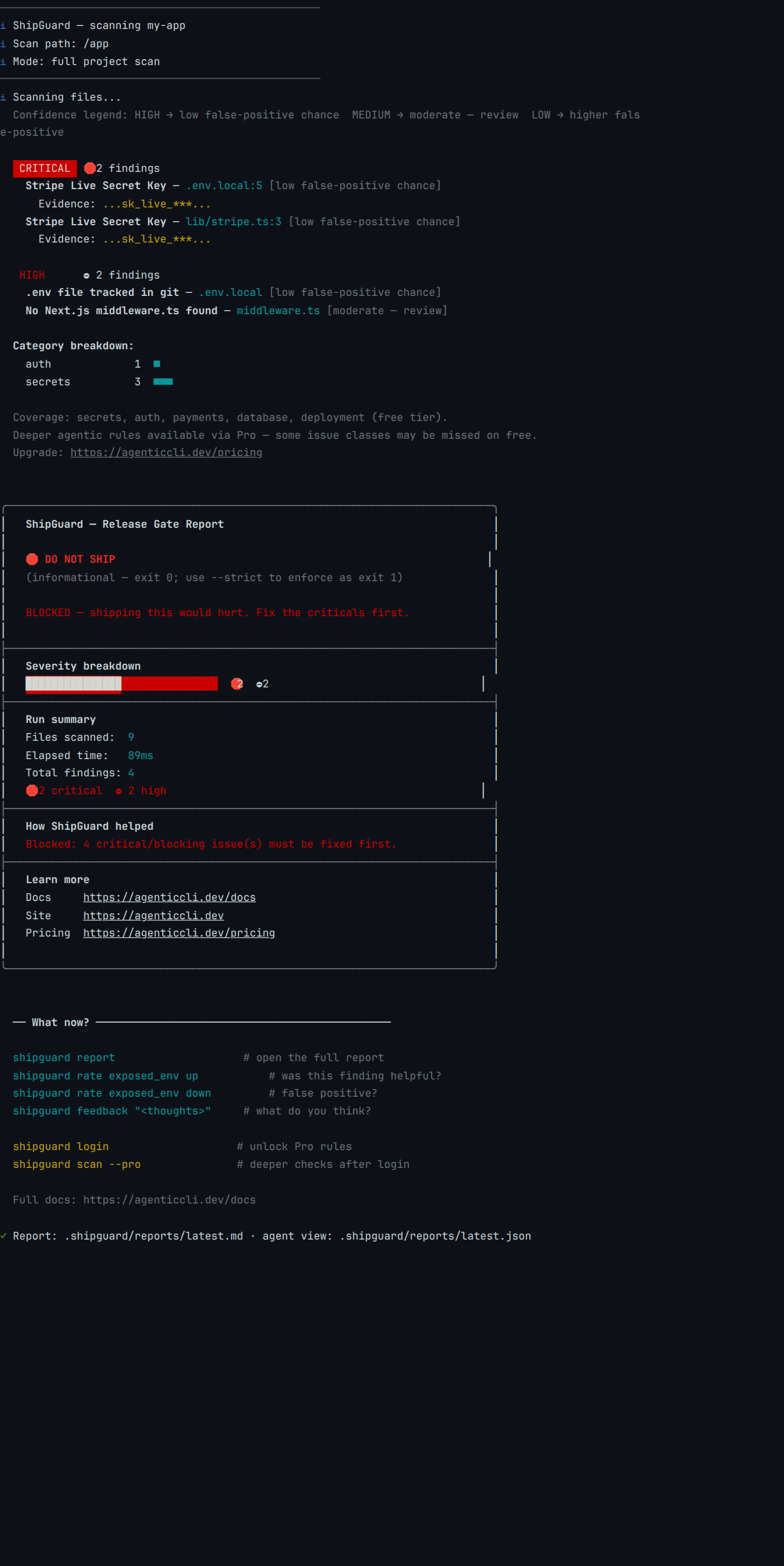
No configuration, no API call, no code upload. Here's the findings section and the run summary from that scan, copied verbatim — the startup banner, the category breakdown, and the boxed report footer are trimmed for length:
   CRITICAL  🛑 2 findings
    Stripe Live Secret Key — .env.local:5 [low false-positive chance]
      Evidence: ...sk_live_***...
    Stripe Live Secret Key — lib/stripe.ts:3 [low false-positive chance]
      Evidence: ...sk_live_***...

   HIGH      ⛔ 2 findings
    .env file tracked in git — .env.local [low false-positive chance]
    No Next.js middleware.ts found — middleware.ts [moderate — review]

   Run summary
   Files scanned:  9
   Elapsed time:   89ms
   Total findings: 4
   🛑 2 critical  ⛔ 2 high
What it caught
Four findings. Nothing added, nothing omitted.
| Severity | Finding | Location | Confidence |
|---|---|---|---|
| CRITICAL | Stripe Live Secret Key hardcoded | .env.local:5 |
High — low false-positive chance |
| CRITICAL | Stripe Live Secret Key hardcoded | lib/stripe.ts:3 |
High — low false-positive chance |
| HIGH | .env file tracked in git |
.env.local |
High — low false-positive chance |
| HIGH | No Next.js middleware.ts found |
middleware.ts (absent) |
Medium — review |
Verdict: DO_NOT_SHIP — files scanned: 9, total findings: 4, critical: 2, high: 2. Timing is the one thing that moves between runs: measured on @agenticcli/shipguard@0.5.0 against content-pipeline/captures/secret-scanner-nextjs-supabase/ in July 2026, thirty repeat runs ranged 89-159ms, median 117ms. The file count, the four findings and the verdict were identical every single time. Exit code without --strict: 0 — the scan completed and the verdict lives in the JSON recommendation field. With --strict, that same run exits 1.
Why each finding matters
CRITICAL: Stripe live secret key hardcoded, in two places
A sk_live_ key in a source file or .env.local is not a theoretical risk. Anyone with repo access — a co-founder, a contractor, a CI runner — can drain the Stripe balance or issue refunds to arbitrary accounts. The key showing up in two places (.env.local:5 and lib/stripe.ts:3) is a secondary signal worth noticing on its own: once a secret gets pasted around a codebase, rotation gets harder and the attack surface multiplies, because rotating one copy silently leaves the other live.
The fix — read it from an environment variable set in your deploy platform, never write it into source — takes a few minutes. Undoing the damage from skipping that step can take months.
HIGH: .env file tracked in git
Git history is permanent. Delete the file in the next commit and the secret still lives in the commit graph — anyone with a clone, now or years from now, can git log their way to it.
This is one of the most common AI-coding mistakes: neither Cursor nor Claude Code nor Codex reliably adds .env* to .gitignore before the first commit. The file gets created, everything gets staged, and it ships. A pre-deploy scan catches this before it reaches the remote.
HIGH: No middleware.ts found
Next.js App Router doesn't enforce authentication by default. Without a middleware.ts at the project root protecting authenticated routes, every route under /dashboard, /account, /admin is reachable by direct URL regardless of what the UI shows a logged-out user.
ShipGuard flags the absence of middleware.ts as HIGH because a missing auth guard is one of the most common classes of AI-generated vulnerability, right behind secrets. It doesn't prove your routes are unprotected — it's a signal to verify, which is why its confidence is "medium — review" rather than "low false-positive chance."
What the free tier doesn't catch
Worth being direct about this, because honesty is worth more than a clean scorecard.
The demo app also has no Row Level Security enabled on its Supabase tables, and in a fuller version of this fixture, a service_role key exposed in a public API route. The free tier does not catch either of these — RLS detection (supabase.rls.table-rls-disabled) is a documented rule in ShipGuard's Pro corpus, gated behind the paid tier's authenticated rule fetch, not part of the free modules (secrets, auth, database, payments, deployment).
If you want to check RLS status today without Pro, look in the Supabase dashboard under Authentication → Policies, or search your API routes for supabase.from('your_table') calls that aren't scoped with a .filter() against auth.uid().
Everything in the findings table above, though, came from the free tier, running locally, with no code leaving the machine.
Gate it in CI
Running the scan manually before every deploy isn't reliable. The fix is one line in your pipeline:
npx @agenticcli/shipguard scan --strict
With --strict, ShipGuard exits 1 when a blocking finding is present — that fails the step. Without --strict, the default is advisory: ShipGuard prints the report and exits 0 regardless of what it found, so the pipeline continues. Use advisory mode on an existing codebase where you want visibility before you enforce; use --strict from day one on a new project.
In GitHub Actions:
- name: ShipGuard security gate
  run: npx @agenticcli/shipguard scan --strict
Wired in on every PR, a committed secret fails the PR before review — not after deploy.
Fix each finding
Stripe live key hardcoded — rotate it immediately in the Stripe Dashboard under Developers → API keys. Remove it from lib/stripe.ts and replace with process.env.STRIPE_SECRET_KEY. Remove it from .env.local and set the real value as an environment variable on your deploy platform instead. Confirm .gitignore includes .env.local.
.env committed to git — add .env* to .gitignore, then git rm --cached .env.local to stop tracking it. Rotate every secret that was in the file — assume the contents are compromised the moment they hit a remote, public or private.
No middleware.ts — create one at the project root:
import { NextResponse } from 'next/server'
import type { NextRequest } from 'next/server'

export function middleware(request: NextRequest) {
  // your auth check here — e.g. verify a session cookie or JWT
}

export const config = {
  matcher: ['/dashboard/:path*', '/account/:path*'],
}
The exact check depends on your auth provider (WorkOS, Supabase Auth, NextAuth, Clerk) — the part that matters is that matcher explicitly lists every route that needs authentication.
Try it
npx @agenticcli/shipguard scan
It finishes before you've finished reading the command you typed. That's not enough time to read a PR diff — it's enough time to catch a live Stripe key before it reaches production.
FAQ
How do I check a Next.js + Supabase app for leaked secrets before deploying?
What is a secret scanner?
Does ShipGuard send my code anywhere?
How is ShipGuard different from gitleaks or GitGuardian?
What does "vibe coding security" mean?
Will ShipGuard catch Supabase RLS issues?
What happens if ShipGuard blocks my pipeline?
────────[ ▮ gate ]────────
Don't ship the next one.
Free, local, no account. Catches this exact bug class before deploy.
$ npx @agenticcli/shipguard scan
Quick start: run ShipGuard locally →Compare ShipGuard with Snyk and Semgrep →