AI Agent Security Risks: 7 Checks No Scanner Answers
Short answer: The excessive-agency risks in an AI agent are which tools it holds, how far its one credential reaches, and whether an irreversible action waits for a person. We built an agent violating seven such checks and read it with ShipGuard, Gitleaks, Semgrep and Trivy. No report named any of the seven.
The invoice agent we wrote last week can run any SQL statement against the billing database, delete any object out of the storage bucket, and email any address on the company's behalf. Two of its six tools are registered inside the request handler rather than in the file that looks like the tool list. Nothing waits for a person before any of it runs.
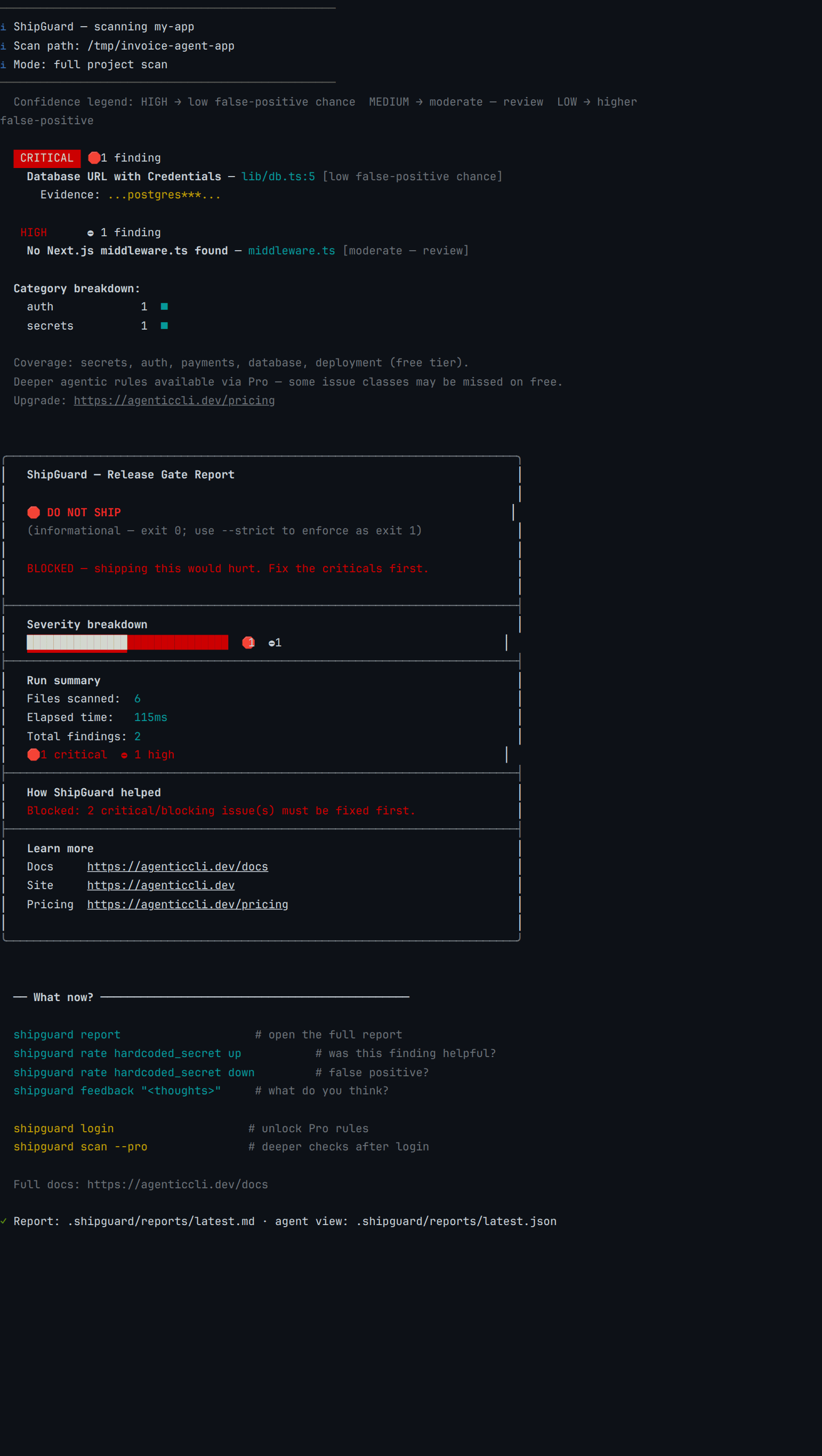
We wrote it that way deliberately, then pointed our own release gate at it. Two findings came back: a password inside a connection string, and a missing middleware.ts. Neither one is about the agent.
That is not a complaint about the tool, and it is the reason a checklist for this exists at all. The things that make an agent dangerous are grants somebody made on purpose, and a grant does not leave a pattern in a file.
What does a deliberately bad agent look like to a scanner?
 Real capture,
 @agenticcli/[email protected], 2026-07-28. Fixture, manifest and per-item map: content-pipeline/captures/agent-checklist-audit/.
The critical finding is real and worth having. lib/db.ts holds a Postgres URL with a password in it, which is exactly what a secret scan is for.
It is also not the problem on that line. The line exists because a development run with no DATABASE_URL set falls through to the production database instead of failing, and the report describes the string rather than the fallback. The high finding is the project-level rule about a missing middleware.ts, which any Next.js project with no agent anywhere in it would also collect.
So the report a reader would act on describes an ordinary web application. The agent is invisible to it.
Which seven things are worth checking before an agent gets write access?
OWASP calls this category Excessive Agency and splits it into functionality that is too broad, permissions that reach too far, and autonomy with nothing in front of it. The seven items below are that split turned into things you can go and look at, in the order our fixture violates them. They sit alongside the more general twelve checks before you ship.
What the agent can do, and what stops it
- Every tool the agent holds is listed in one place. Open the file that defines the toolset and count them. Then search the request handler for a second registration, because a tool added at request time never appears in the list a reviewer reads. Ours splits them four and two, across
lib/tools.ts:5andapp/api/agent/route.ts:9. - No tool is a general-purpose executor. A
run_sqlthat takes any statement, or arun_shellthat takes any command, hands the model the entire surface behind it. A narrow function per task shrinks the worst case to what that function does. Both are in our fixture, and one of them says so in its own description atlib/tools.ts:10: run any SQL statement against the billing database. - An irreversible action waits for a person, and the wait has been tested. Not read in the source, where every gate looks like it holds, but exercised with an argument shaped to be awkward rather than one shaped to work, in a place where being wrong costs nothing. There is nothing to exercise in ours —
lib/execute.ts:8reaches the switch that runs the call three lines later.
How far does one credential reach?
The remaining four are about the blast radius of a call that has already been made, and about whether you would be able to reconstruct it afterwards. Two of them are the opening seven lines of one file in our fixture:
// C4: one credential, three services. The same bearer token authorizes the billing
// database, the invoices storage bucket, and the backups those objects are copied to,
// so a tool that can delete an object can also delete the copy of it.
// C7: and it has a hardcoded fallback, so the repo carries a working-shaped literal.
const FALLBACK = "plat_live_FAKE9xQwErTyUiOp51ZmNbVcXsAqWdEf";

export const PLATFORM_TOKEN = process.env.PLATFORM_API_TOKEN || FALLBACK;
lib/platform.ts:1-7, generated by terminal-lab/docker-images/snippets/agent-checklist-audit/gen.sh. The literal is a fake test token.
- The credential reaches what the task needs and no further. Read what the token authorises at the provider rather than what the code appears to use it for. One bearer token covering a database, a bucket and the backups of both is a single call away from all three; line 7 above is ours, and
lib/platform.ts:13puts it in theAuthorizationheader of every call. The row-level security audit is the database-side version of the same question. A scope you wrote down is also not a scope until something enforces it: CVE-2025-53110 records that@modelcontextprotocol/server-filesystem, before 0.6.3 and 2025.7.1, could reach files outside its allowed directory whenever a path prefix matched one.
What else can you find by reading?
- A development run cannot reach production. Check what happens when the variable naming the database is absent. A fallback that quietly resolves to the live instance turns "I was only testing locally" into a production write.
lib/db.ts:7is where ours does it, and the string it falls back to sits two lines above. - Every tool call is logged with its arguments, before it runs. A line written afterwards records what succeeded. Find the logging call and confirm it is not commented out, which is how ours ended up that way during a debugging session that nobody undid. It is still there, at
lib/execute.ts:9, annotated "re-enable before launch". - No credential literal sits in the tree. This is the single item on the list where a scanner is the right instrument, and it is worth running one. Ours is the
FALLBACKconstant in the block above.
Do any scanners answer these checks?
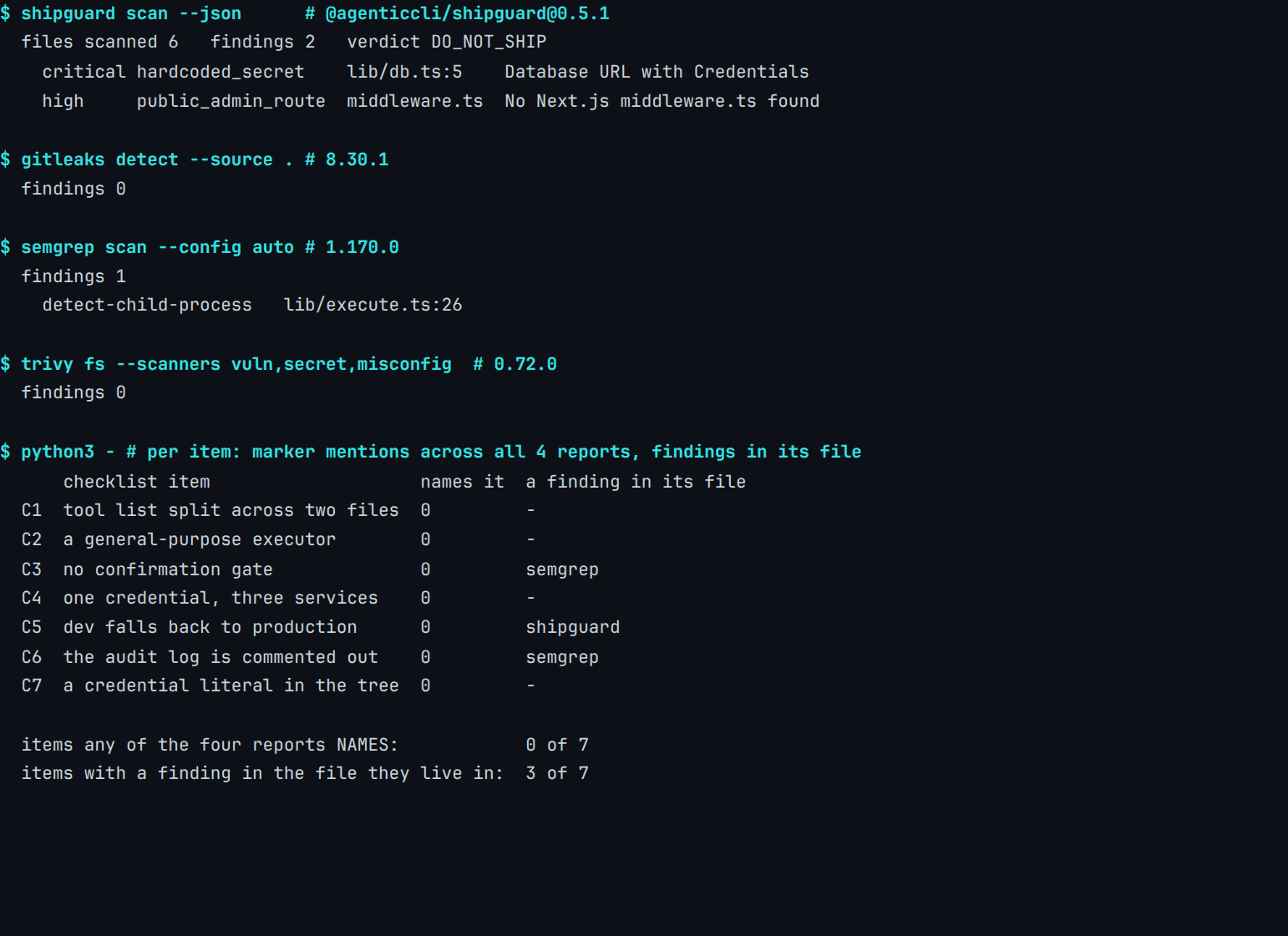
The fixture violates each of the seven exactly once, in its own place, with a marker term unique to it. Then four tools read the identical tree and the result is reported per item rather than per tool.
 Real capture:
 @agenticcli/[email protected] on the host, Gitleaks 8.30.1, Semgrep 1.170.0 and Trivy 0.72.0 from one container image, 2026-07-28. Reproduce with content-pipeline/benchmarks/agent-checklist/run.sh.
| Scanner | On this fixture |
|---|---|
| ShipGuard 0.5.1 | 2 findings: a Postgres URL carrying a password, and a missing middleware.ts |
| Gitleaks 8.30.1 | 0 findings |
| Semgrep 1.170.0 | 1 finding: detect-child-process on lib/execute.ts |
| Trivy 0.72.0 | 0 findings |
Which items did a tool at least land near?
Three of the seven items live in a file where something did fire, and that is the more interesting column. Semgrep's detect-child-process lands on lib/execute.ts, which is also where the missing confirmation step and the commented-out audit log live; it is reporting the execSync call and neither of them. ShipGuard's match lands on lib/db.ts, the production fallback, for the password inside the string rather than for the fallback itself.
Two credential literals sit in that tree, and only one matched. The bespoke platform token in lib/platform.ts walked through all four tools, because secret rules match known provider shapes and an invented platform has no shape to match.
That miss is ours, on item seven, the one item where a scanner was supposed to be the right answer. The same pattern-versus-provider limit turns up across the secret scanners we compared, and it is worth knowing before you read a clean secrets report as meaning an agent's credentials are accounted for.
Why does the confirmation step keep failing?
Item three is the one everybody writes down. It is also the one four advisories describe going wrong in two shipped products: three times because a command was parsed wrong, once because a tool allowlist was never evaluated.
The Model Context Protocol specification states the requirement plainly, in a callout on its Tools page rather than in the security document people usually quote:
For trust & safety and security, there SHOULD always be a human in the loop with the ability to deny tool invocations.
— Model Context Protocol specification 2025-06-18, Tools
Claude Code has that gate, and it is not a token one: a user is shown the command and asked. It has still been walked past three times, on three different commands, across three releases, each time because of how the command was parsed rather than because the prompt was missing.
What do the advisories themselves say?
| Advisory | The command | First patched version |
|---|---|---|
| CVE-2025-54795 | echo |
1.0.20, August 2025 |
| CVE-2025-58764 | rg |
1.0.105, September 2025 |
| CVE-2026-24887 | find |
2.0.72, February 2026 |
The first of them opens like this, and the second opens with the identical sentence five weeks later:
Due to an error in command parsing, it was possible to bypass the Claude Code confirmation prompt to trigger execution of an untrusted command.
— GitHub Advisory Database, GHSA-x56v-x2h6-7j34, 4 August 2025
Credited reporters, in order: Elad Beber of Cymulate, the NVIDIA AI Red Team, and a researcher who came in through HackerOne.
What does the fourth advisory add?
A fourth belongs beside them, from a different vendor. GHSA-wpqr-6v78-jr5g (the advisory page now lists CVE-2026-12537), published 24 April 2026 and rated critical, records that under --yolo the Gemini CLI ignored the fine-grained tool allowlist in ~/.gemini/settings.json, so a pipeline that had carefully allowlisted a few safe commands was running with none of that in force.
That one is not a parsing bug. It is a gate somebody configured and nothing consulted.
None of the four is an incident with a victim. Each is a disclosure with a credited reporter and a shipped fix, which is the system working as intended.
A confirmation gate you can read in the source is not a confirmation gate you have tested. Our audit of what Claude Code produces and our Cursor review both start one layer up from that.
So what does answer each check?
Seven items, one fixture, four scanners
What a tool returned, and what actually settles it
The same seven rows in both panels. Left: what ShipGuard, Gitleaks, Semgrep and Trivy returned against a fixture violating every item. Right: the instrument that can answer the item at all.
The right-hand column says which instrument should answer an item. It is not a record of what any instrument did answer: a scanner is the right tool for C7 alone, and on this tree it matched one of the two credential literals and missed the other, so a clean report there would still have been wrong.
The one item we cannot do for you is C3, the confirmation gate. Checking that a confirmation gate holds means driving a live agent at it with an argument shaped to be awkward, in an environment where a mistake is cheap.
We did not build that, and a fixture cannot stand in for it. Ours proves the gate is absent; the interesting failures all happened in products where the gate was present and parsed its way around itself.
What this leaves you doing by hand
Nothing in what we ship fires on any of the seven, and the agent-security pillar reaches the same result from a different fixture and a different direction. The scan is worth running for the file-shaped problems it does cover: secrets, auth, database, payments and deployment configuration. On this tree it found a planted credential and an unguarded project layout.
For the rest, the work is a read rather than a run: the tool file, the request handler in case it registers more, the line where the credential is built, and the provider page that says what that credential authorises. Do it once before the agent gets write access, and again whenever somebody adds a tool.
The one item to spend real time on is the third, because it is the only one where reading the code and testing the behaviour give different answers, and four advisories say the difference is where the failures live.
Published by AgenticCLI — developer tools for teams shipping AI-assisted code. ShipGuard is a deterministic, CLI-first release gate that runs locally, with no code leaving your machine on the free tier. See all checks at agenticcli.dev/shipguard.
FAQ
What are the main AI agent security risks?
What is excessive agency in an LLM application?
Can a code scanner detect excessive agency in an AI agent?
Why is a confirmation prompt not enough on its own?
What should I check before giving an AI agent write access?
Does ShipGuard catch these AI agent security risks today?
────────[ ▮ gate ]────────
Don't ship the next one.
Free, local, no account. Catches this exact bug class before deploy.
$ npx @agenticcli/shipguard scan